PicCat Restoring your images and input…

AI product map refinement

AI product map refinementInstructions for use

The PicCat AI product image refining tool can clean dust, messy reflections and small defects on the surface of the product, and improve the texture of product images such as metal, glass, and packaging.

Applicable scenarios

  • Suitable for personal, operational, e-commerce and office scenarios that need to quickly complete AI product map refinement.
  • Support the completion of main operations in the browser, and preview the effects and parameters before processing.
  • It is suitable for batch organizing materials, optimizing release files, and improving the usability of pictures or documents.

Usage steps

  1. Open the AI product map refinement page and select the picture or file that needs to be processed.
  2. Adjust processing mode, size, quality or AI parameters according to page prompts.
  3. After confirming the preview result, export the file and continue processing the next one or return to the tool list.

AI product map refinementTreatment effect case

Essence bottle defect cleaning

Clean the dust, scratches and messy highlights in the dark essence bottle product picture, retain the glass material and label text

Chinese tea set defect cleaning

Clean the dust, scratches and fingerprint stains on the surface of the Chinese celadon tea cup, and restore the original warm luster and high-grade texture of the ceramic

National fashion beauty gift box refinement

One-click removal of fine dust, scratches and messy high-gloss reflections on the surface of the beauty gift box, allowing the product to present a flawless high-end commercial blockbuster texture

Frequently Asked Questions

What usage scenarios does AI product map refinement support?

The PicCat AI product image refining tool can clean dust, messy reflections and small defects on the surface of the product, and improve the texture of product images such as metal, glass, and packaging. Common uses include AI product image refining, product image retouching, e-commerce refining, product defect removal, etc.

Will AI product map refinement save my original file?

PicCat only provides online multimedia editing technology services. Some lightweight functions are processed locally in the browser, and functions involving AI or high-precision conversion will call cloud processing. After the processing is completed, the temporary files will be destroyed according to the page declaration.

What should I do if AI product map refinement fails to process?

It is recommended to check the file format, size and clarity first, and if necessary, replace the file and try again. If it fails multiple times, you can submit a problem through the feedback portal in the upper right corner of the page.

Real picture modification case

Let’s see how AI product image refinement improves product quality

From glass essence bottles, celadon tea sets to beauty gift boxes, dust, scratches, fingerprints and messy highlights can be cleaned by uploading product images.

Case 01

Glass essence bottle removes blemishes

Clean the dust, fingerprints and small scratches on the bottle body, and retain the transparency, reflection and label details of the dark glass.
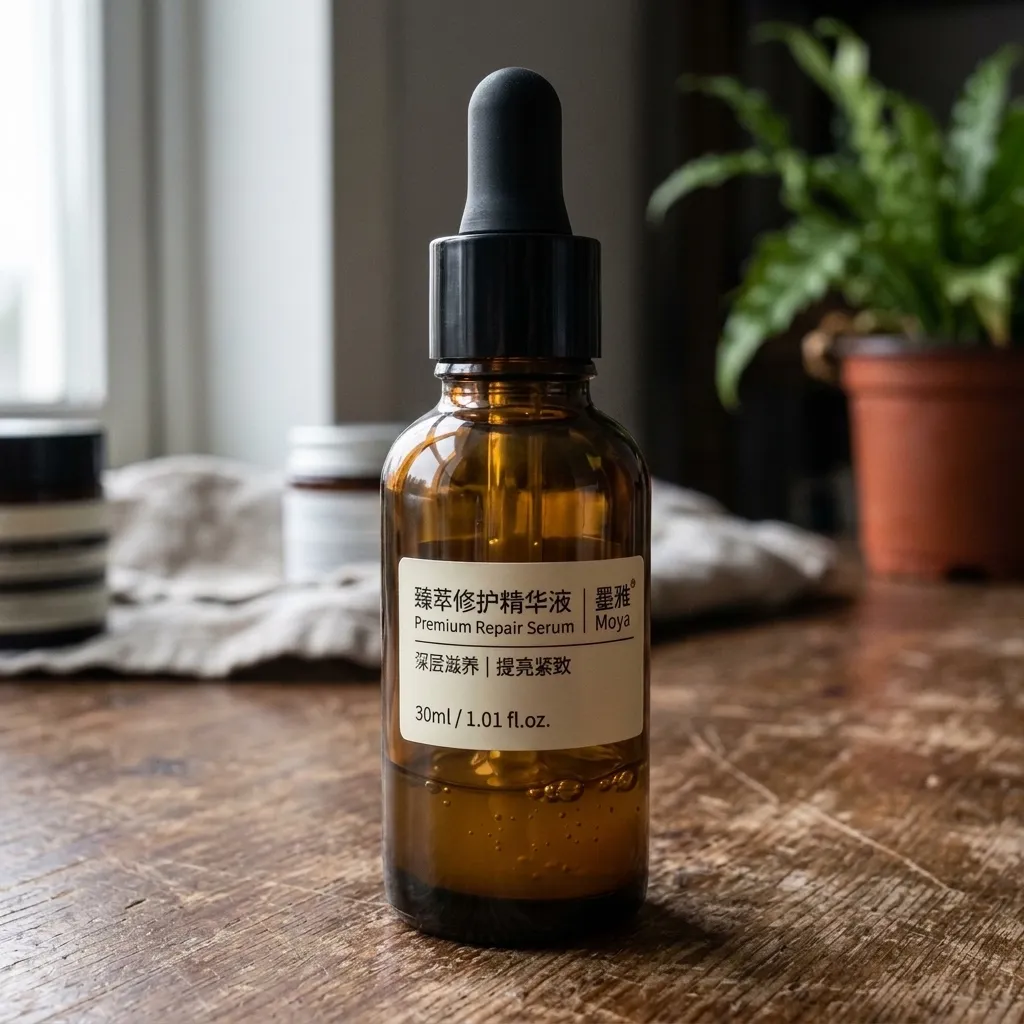
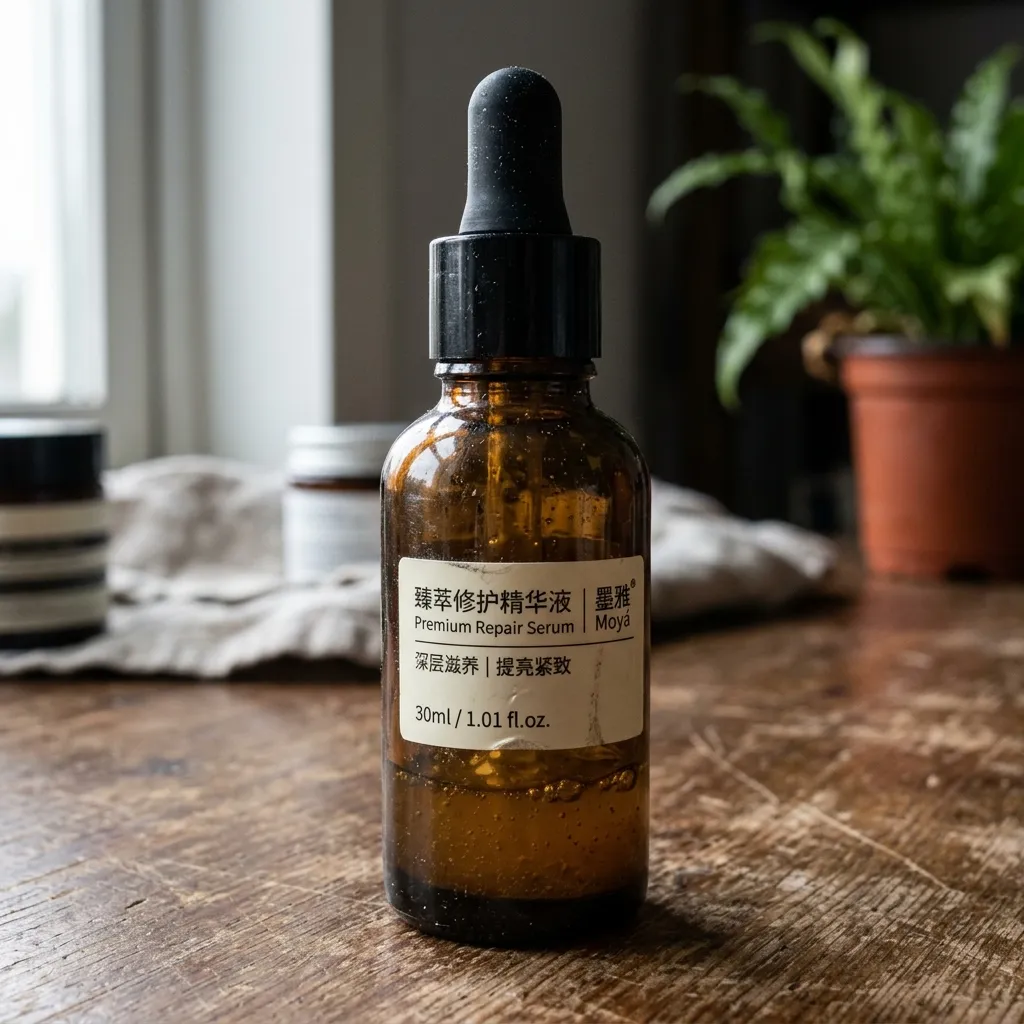
Picture of defective product→After refinement
  • Priority is given to uploading a clear main picture or detailed picture of the product, with the main body of the product and the label area as complete as possible.
  • After the processing is completed, please zoom in to check whether the logo, label text, outline, material and color are consistent with the real product.
This example illustrates the workflow. Actual results depend on the original image, marked area and instructions.
AI product refinement case: dark glass essence bottle after cleaning dust and fingerprints
AI Product Refinement Case: Pre-processing Picture of Dark Glass Essence Bottle with Dust and Fingerprints
Case pictures are loading...
Case 02

Metal watch polishing and finishing

Clean the floating dust, fingerprints and disturbing reflections on the dial and metal strap, while retaining the metal highlights and edge structure.

Watches to be organized→After refinement
  • Priority is given to uploading a clear main picture or detailed picture of the product, with the main body of the product and the label area as complete as possible.
  • After the processing is completed, please zoom in to check whether the logo, label text, outline, material and color are consistent with the real product.
This example illustrates the workflow. Actual results depend on the original image, marked area and instructions.
AI product refinement case: the picture of a metal watch after dust and fingerprints have been sorted
AI product refinement case: the picture before processing of metal watch strap dust and fingerprints
Case pictures are loading...
Case 03

Ceramic tea set cleaning

Clean the stains, dust and desktop debris on the cup body, and retain the highlights, shadows and utensil outlines of the ceramic glaze.

Tea set to be cleaned→After refinement
  • Priority is given to uploading a clear main picture or detailed picture of the product, with the main body of the product and the label area as complete as possible.
  • After the processing is completed, please zoom in to check whether the logo, label text, outline, material and color are consistent with the real product.
This example illustrates the workflow. Actual results depend on the original image, marked area and instructions.
AI product refinement case: white ceramic tea set after cleaning stains and dust
AI product refinement case: white ceramic tea set with stains and dust before treatment
Case pictures are loading...
Case 04

Beauty gift box texture refinement

Remove dust, small scratches and uneven reflections from the surface of the gift box, retaining the packaging texture, corners and true shadows.

Gift box to be refined→After refinement
  • Priority is given to uploading a clear main picture or detailed picture of the product, with the main body of the product and the label area as complete as possible.
  • After the processing is completed, please zoom in to check whether the logo, label text, outline, material and color are consistent with the real product.
This example illustrates the workflow. Actual results depend on the original image, marked area and instructions.
AI product refinement case: Beauty gift box after cleaning dust and scratches
AI product refinement case: beauty gift box with dust and scratches before processing picture
Case pictures are loading...