Erase handwritten answers, vertical procedures, and red correction marks in math exercises, retaining printed questions and table structures
 Restoring your images and input…
PicCat student handwriting homework erasing tool supports erasing handwriting on test papers, exercise books and homework pictures, and restores blank questions as much as possible.
Erase handwritten answers, vertical procedures, and red correction marks in math exercises, retaining printed questions and table structures
Clean some blue calculations and red correction marks from a science test. Compare the printed questions and diagrams; some handwriting remains.
Clean handwritten English from a ruled workbook. Compare the retained lines and heading; some faint writing and correction marks remain.
Remove handwritten answers and underlining from a Chinese reading worksheet. Compare the printed passages, questions and answer lines, and inspect any remaining marks.
Clean answers and correction marks from a Chinese fill-in worksheet. Check the pinyin, characters, question numbers and printed decorations.
Remove written answers and red corrections from a mathematics worksheet, comparing the retained diagrams, equations and answer areas.
Clean handwritten calculations from arithmetic, fill-in and word problems. Check operators, units and illustrations before use.
Remove handwritten answers and correction marks from diagram exercises. Compare the grids, table borders and printed questions.
Clean dense handwriting from a comprehensive mathematics test. Compare multiple-choice questions, calculations and tables, and inspect overlapping areas.
PicCat student handwriting homework erasing tool supports erasing handwriting on test papers, exercise books and homework pictures, and restores blank questions as much as possible. Common uses include Handwriting erasure, test paper handwriting erasure, homework erasure, restoration of blank questions, etc.
PicCat only provides online multimedia editing technology services. Some lightweight functions are processed locally in the browser, and functions involving AI or high-precision conversion will call cloud processing. After the processing is completed, the temporary files will be destroyed according to the page declaration.
It is recommended to check the file format, size and clarity first, and if necessary, replace the file and try again. If it fails multiple times, you can submit a problem through the feedback portal in the upper right corner of the page.
Upload a completed worksheet to erase handwriting while keeping the printed questions.
Erase handwritten answers, vertical procedures, and red correction marks in math exercises, retaining printed questions and table structures
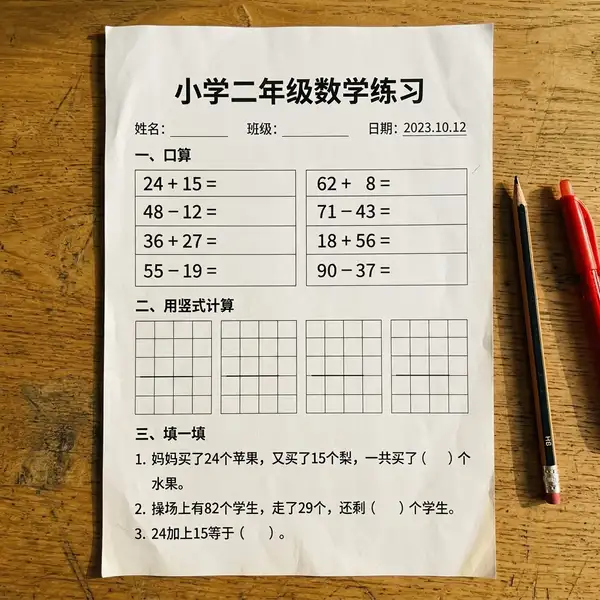
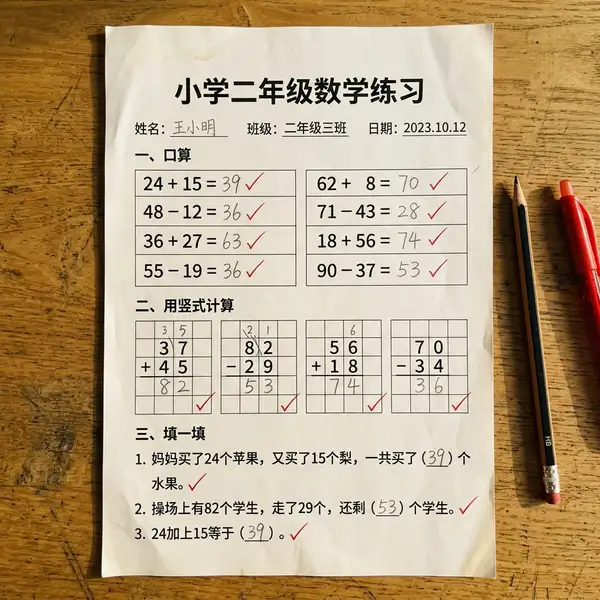
Clean some blue calculations and red correction marks from a science test. Compare the printed questions and diagrams; some handwriting remains.


Clean handwritten English from a ruled workbook. Compare the retained lines and heading; some faint writing and correction marks remain.


Remove handwritten answers and underlining from a Chinese reading worksheet. Compare the printed passages, questions and answer lines, and inspect any remaining marks.


Clean answers and correction marks from a Chinese fill-in worksheet. Check the pinyin, characters, question numbers and printed decorations.


Remove written answers and red corrections from a mathematics worksheet, comparing the retained diagrams, equations and answer areas.


Clean handwritten calculations from arithmetic, fill-in and word problems. Check operators, units and illustrations before use.


Remove handwritten answers and correction marks from diagram exercises. Compare the grids, table borders and printed questions.


Clean dense handwriting from a comprehensive mathematics test. Compare multiple-choice questions, calculations and tables, and inspect overlapping areas.