PicCat Restoring your images and input…

AI Product Photos

AI Product Photo GeneratorInstructions for use

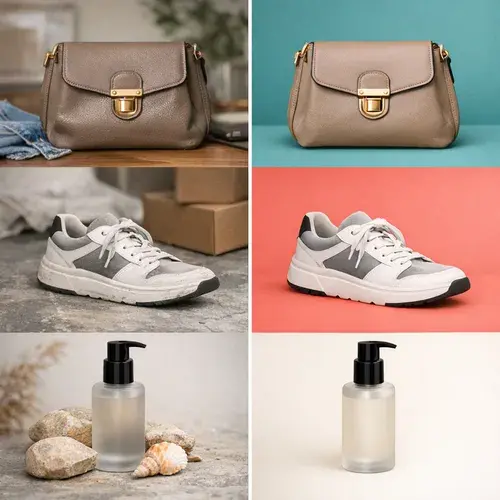
After uploading the product image, AI automatically cuts out the subject and replaces it with an e-commerce scene, a solid color background or a customized background, and quickly produces Taobao, Pinduoduo, Xiaohongshu and cross-border e-commerce main images, detail images and marketing poster materials.

Applicable scenarios

  • Suitable for personal, operational, e-commerce and office scenarios that need to quickly complete Product changes background.
  • Support the completion of main operations in the browser, and preview the effects and parameters before processing.
  • It is suitable for batch organizing materials, optimizing release files, and improving the usability of pictures or documents.

Usage steps

  1. Open the AI Product Photo Generator page and select the picture or file that needs to be processed.
  2. Adjust processing mode, size, quality or AI parameters according to page prompts.
  3. After confirming the preview result, export the file and continue processing the next one or return to the tool list.

AI Product Photo GeneratorTreatment effect case

Essence bottle scene changes background

Replace the simple studio shooting background with an oriental waterscape display scene to maintain the position and proportion of the main product.

Modern Hanfu scene changing background

Replace the background of the studio shot with a modern Chinese garden scene to show the unique charm of cultural costumes

Intelligent tea set changes background

Replace the messy office desk background with a Chinese Zen tea table scene to enhance the cultural tonality of technological products

Frequently Asked Questions

What usage scenarios does AI Product Photo Generator support?

After uploading the product image, AI automatically cuts out the subject and replaces it with an e-commerce scene, a solid color background or a customized background, and quickly produces Taobao, Pinduoduo, Xiaohongshu and cross-border e-commerce main images, detail images and marketing poster materials. Common uses include Product background change, e-commerce background change, AI product image, product scene image, etc.

Will AI Product Photo Generator save my original file?

PicCat only provides online multimedia editing technology services. Some lightweight functions are processed locally in the browser, and functions involving AI or high-precision conversion will call cloud processing. After the processing is completed, the temporary files will be destroyed according to the page declaration.

What should I do if AI Product Photo Generator fails to process?

It is recommended to check the file format, size and clarity first, and if necessary, replace the file and try again. If it fails multiple times, you can submit a problem through the feedback portal in the upper right corner of the page.

Real AI Product Photo Examples

One product photo, multiple scene styles

See the same green handbag in a romantic dinner setting, festive scenes, a wood interior, and blue silk. Select an image below to explore the square and portrait results.

1 original product photo6 generated imagesSquare and portrait formats
Product original picture
Current previewNo. 01 images
Romantic Dinner
6 product scene imagesClick to switch preview
Upload a product photo and choose your scenesSelect templates across categories and adjust the canvas ratio and product placement. Your generated results may vary.
Real AI Product Photo Examples

A dusty-rose handbag in 7 romantic and festive scenes

One dusty-rose handbag, transformed from a simple product photo into seven scenes: romantic dinner, soft curtains, a natural fairytale, romantic memories, a romantic celebration, peanut blessings and holiday gifts. Click an image to see the details.

1 original product photo7 generated imagesOne product, multiple scenes
Product original picture
Current previewNo. 01 images
Romantic Dinner
7 product scene imagesClick to switch preview
Upload a product photo and choose your scenesSelect templates across categories and adjust the canvas ratio and product placement. Your generated results may vary.
Real AI Product Photo Examples

Two perfume bottles in six floral and nature settings

The same pair of perfume bottles is transformed from a simple product photo into six settings: turquoise elegance, a romantic dinner, peonies, meadow plants, a forest stream, and spring blossoms. Click an image to see the details.

1 original product photo6 generated imagesOne product, multiple scenes
Product original picture
Current previewNo. 01 images
Turquoise Elegance
6 product scene imagesClick to switch preview
Upload a product photo and choose your scenesSelect templates across categories and adjust the canvas ratio and product placement. Your generated results may vary.
Real AI Product Photo Examples

Dropper skincare serums in six natural and indoor settings

The same three dropper serum bottles are transformed from a simple product photo into six settings: a leafy tree stump, marble, an indoor café, peonies, meadow plants, and pine with slate. Click an image to see the details.

1 original product photo6 generated imagesOne product, multiple scenes
Product original picture
Current previewNo. 01 images
Woodland Shadows
6 product scene imagesClick to switch preview
Upload a product photo and choose your scenesSelect templates across categories and adjust the canvas ratio and product placement. Your generated results may vary.
Real AI Product Photo Examples

A purple sneaker in seven nature and active lifestyle settings

The same purple sneaker is transformed from a white-background photo into seven settings: pink romance, a leafy tree stump, cherry blossoms, stream stones, a forest stream, mountain ranges, and an autumn court. Click an image to see the details.

1 original product photo7 generated imagesOne product, multiple scenes
Product original picture
Current previewNo. 01 images
Pink Romance
7 product scene imagesClick to switch preview
Upload a product photo and choose your scenesSelect templates across categories and adjust the canvas ratio and product placement. Your generated results may vary.
Real AI Product Photo Examples

White over-ear headphones in six home and atmospheric settings

The same white over-ear headphones are transformed from the original photo into six settings: romantic curtains, a dark wood surface, a living room, an autumn setting, snowy peaks, and roses. Click an image to see the details.

1 original product photo6 generated imagesOne product, multiple scenes
Product original picture
Current previewNo. 01 images
Romantic Drapes
6 product scene imagesClick to switch preview
Upload a product photo and choose your scenesSelect templates across categories and adjust the canvas ratio and product placement. Your generated results may vary.

From scene selection to result preview

Choose templates and adjust the product layout. After generation, select a thumbnail to view each scene.