PicCat Restoring your images and input…

AI universal becomes clear

Pictures become clearer onlineInstructions for use

PicCat AI picture sharpening tool supports uploading blurred photos, low-definition pictures, compression damage screenshots and old pictures to improve clarity, edge details and overall look and feel online.

Applicable scenarios

  • Repair blurry photos, low-definition screenshots, social media compressed images and slightly out-of-focus images.
  • Suitable for enhancing the clarity of daily photos, product pictures, avatars, ID photo materials and old pictures.
  • It can be further optimized with tools such as portrait clarity, lossless enlargement, and old photo restoration.

Usage steps

  1. Upload pictures that need to be repaired or sharpened.
  2. Select the general sharpening mode and wait for AI to enhance texture, edges and the overall picture.
  3. Compare the effects before and after repair, confirm the naturalness and then download the results.

Pictures become clearer onlineTreatment effect case

Traditional architecture enhancement

Reduce blur in a traditional Chinese building photograph and enhance visible details in the eaves, carvings and roof tiles.

Cityscape enhancement

Enhance building outlines, water details and overall clarity in a photograph taken from Shanghai’s Bund.

Indoor portrait enhancement

Reduce blur in an indoor portrait and enhance visible details in the eyes, hair and knitwear.

City skyline clarity enhancement

A licensed Shanghai riverside skyline was deliberately degraded and then processed with the general clarity-enhancement tool. Compare the changes in building edges, lights and reflections on the water.

Bookshop shelf clarity enhancement

A licensed Suzhou bookshop photograph was deliberately degraded and then processed with the general clarity-enhancement tool. Compare the changes in bookshelves, book edges and interior displays.

Food photo clarity enhancement

A licensed Beijing food photograph was deliberately degraded and then processed with the general clarity-enhancement tool. Compare the changes in noodles, toppings and tableware edges.

Hotel interior clarity enhancement

A licensed Huizhou hotel interior photograph was deliberately degraded and then processed with the general clarity-enhancement tool. Compare the changes in tables, chairs, wood textures and furnishings.

Garden greenery clarity enhancement

A licensed Shenzhen garden photograph was deliberately degraded and then processed with the general clarity-enhancement tool. Compare the changes in layers of foliage, rocks and flowing water.

Modern shopping street clarity enhancement

A licensed Guangzhou shopping-street photograph was deliberately degraded and then processed with the general clarity-enhancement tool. Compare the changes in building edges, street details and sign outlines.

Frequently Asked Questions

Can severe blurring be repaired by clearing the picture?

Slight blur, compressed noise, and low-resolution images are generally more stable. Pictures with severe motion blur or missing key information cannot be guaranteed to be completely restored.

Which repair tool should be used for portrait photos?

Ordinary photos can be sharpened first with general purpose; if the details of the face are mainly unclear, it is recommended to use portrait sharpening.

Will the picture become larger after repair?

Different modes may have different output sizes. If you need to enlarge the size, it is recommended to use a non-destructive enlargement tool.

Real picture modification case

AI universal becomes clear

Upload a blurry image, restore its quality, compare details and download.

Case 01

Traditional architecture enhancement

Reduce blur in a traditional Chinese building photograph and enhance visible details in the eaves, carvings and roof tiles.
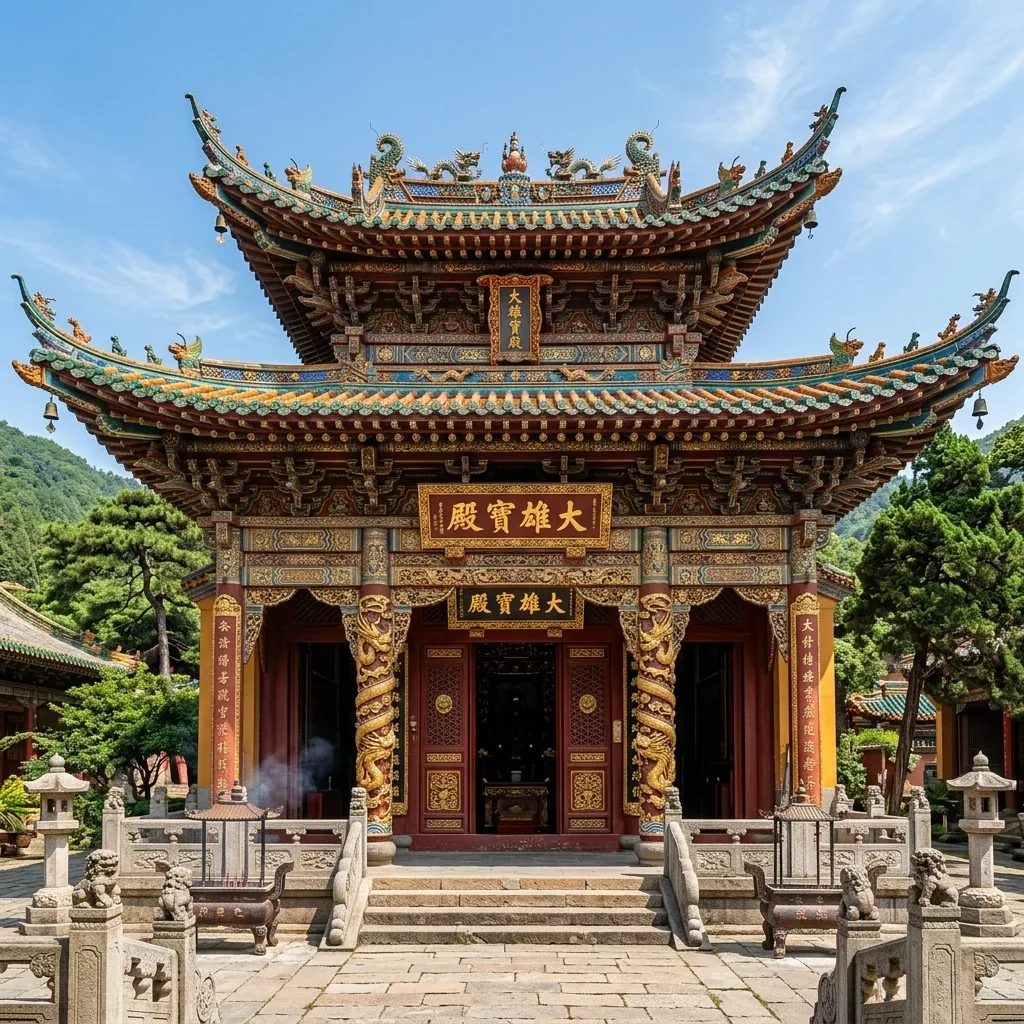
Blurred original image→After becoming clear
  • Upload the original blurry or shaky image and click Enhance.
  • Zoom in to compare textures and edges, then check the image before downloading.
Examples show the processing effect. Results depend on source image clarity and settings.
AI picture becomes clearer case: after the texture of wood carving tiles in Chinese ancient buildings is enhanced
AI picture clearing case: before the details of Chinese ancient buildings are blurred
Case pictures are loading...
Case 02

Cityscape enhancement

Enhance building outlines, water details and overall clarity in a photograph taken from Shanghai’s Bund.

Low definition scenery→After becoming clear
  • Upload the original blurry or shaky image and click Enhance.
  • Zoom in to compare textures and edges, then check the image before downloading.
Examples show the processing effect. Results depend on source image clarity and settings.
AI picture clearing case: Shanghai Bund scenery building water surface details enhanced
AI picture clearing case: Shanghai Bund city scenery before low pixel enhancement
Case pictures are loading...
Case 03

Indoor portrait enhancement

Reduce blur in an indoor portrait and enhance visible details in the eyes, hair and knitwear.

Low definition portrait→After becoming clear
  • Upload the original blurry or shaky image and click Enhance.
  • Zoom in to compare textures and edges, then check the image before downloading.
Examples show the processing effect. Results depend on source image clarity and settings.
AI clarity example: indoor portrait of a woman after detail enhancement
AI clarity example: indoor portrait of a woman before processing
Case pictures are loading...
Case 04

City skyline clarity enhancement

A licensed Shanghai riverside skyline was deliberately degraded and then processed with the general clarity-enhancement tool. Compare the changes in building edges, lights and reflections on the water.

Simulated low-quality photo→Actual enhanced result
  • Upload the original blurry or shaky image and click Enhance.
  • Zoom in to compare textures and edges, then check the image before downloading.
Examples show the processing effect. Results depend on source image clarity and settings.Original source · Ernest Jourdier · CC BY 4.0The original was deliberately degraded, AI-enhanced, resized and compressed; the processed image retains the original license.
City skyline clarity enhancement: Actual enhanced result
City skyline clarity enhancement: Simulated low-quality photo
Case pictures are loading...
Case 05

Bookshop shelf clarity enhancement

A licensed Suzhou bookshop photograph was deliberately degraded and then processed with the general clarity-enhancement tool. Compare the changes in bookshelves, book edges and interior displays.

Simulated low-quality photo→Actual enhanced result
  • Upload the original blurry or shaky image and click Enhance.
  • Zoom in to compare textures and edges, then check the image before downloading.
Examples show the processing effect. Results depend on source image clarity and settings.Original source · Shwangtianyuan · CC BY-SA 4.0The original was deliberately degraded, AI-enhanced, resized and compressed; the processed image retains the original license.
Bookshop shelf clarity enhancement: Actual enhanced result
Bookshop shelf clarity enhancement: Simulated low-quality photo
Case pictures are loading...
Case 06

Food photo clarity enhancement

A licensed Beijing food photograph was deliberately degraded and then processed with the general clarity-enhancement tool. Compare the changes in noodles, toppings and tableware edges.

Simulated low-quality photo→Actual enhanced result
  • Upload the original blurry or shaky image and click Enhance.
  • Zoom in to compare textures and edges, then check the image before downloading.
Examples show the processing effect. Results depend on source image clarity and settings.Original source · N509FZ · CC BY-SA 4.0The original was deliberately degraded, AI-enhanced, resized and compressed; the processed image retains the original license.
Food photo clarity enhancement: Actual enhanced result
Food photo clarity enhancement: Simulated low-quality photo
Case pictures are loading...
Case 07

Hotel interior clarity enhancement

A licensed Huizhou hotel interior photograph was deliberately degraded and then processed with the general clarity-enhancement tool. Compare the changes in tables, chairs, wood textures and furnishings.

Simulated low-quality photo→Actual enhanced result
  • Upload the original blurry or shaky image and click Enhance.
  • Zoom in to compare textures and edges, then check the image before downloading.
Examples show the processing effect. Results depend on source image clarity and settings.Original source · HuiDongXLW RMDa · CC BY-SA 4.0The original was deliberately degraded, AI-enhanced, resized and compressed; the processed image retains the original license.
Hotel interior clarity enhancement: Actual enhanced result
Hotel interior clarity enhancement: Simulated low-quality photo
Case pictures are loading...
Case 08

Garden greenery clarity enhancement

A licensed Shenzhen garden photograph was deliberately degraded and then processed with the general clarity-enhancement tool. Compare the changes in layers of foliage, rocks and flowing water.

Simulated low-quality photo→Actual enhanced result
  • Upload the original blurry or shaky image and click Enhance.
  • Zoom in to compare textures and edges, then check the image before downloading.
Examples show the processing effect. Results depend on source image clarity and settings.Original source · Huangdan2060 · CC0The original was deliberately degraded, AI-enhanced, resized and compressed; the processed image retains the original license.
Garden greenery clarity enhancement: Actual enhanced result
Garden greenery clarity enhancement: Simulated low-quality photo
Case pictures are loading...
Case 09

Modern shopping street clarity enhancement

A licensed Guangzhou shopping-street photograph was deliberately degraded and then processed with the general clarity-enhancement tool. Compare the changes in building edges, street details and sign outlines.

Simulated low-quality photo→Actual enhanced result
  • Upload the original blurry or shaky image and click Enhance.
  • Zoom in to compare textures and edges, then check the image before downloading.
Examples show the processing effect. Results depend on source image clarity and settings.Original source · Daniel Lu (User:dllu) · CC BY-SA 4.0The original was deliberately degraded, AI-enhanced, resized and compressed; the processed image retains the original license.
Modern shopping street clarity enhancement: Actual enhanced result
Modern shopping street clarity enhancement: Simulated low-quality photo
Case pictures are loading...
View user guide