PicCat Restoring your images and input…

Online picture text editing

AI modification of picture text: Online intelligent replacement of words on pictures

After uploading the picture, completely select the original text, fill in the new text and manually adjust the range. AI will try to match the original font, layout and background effects without installing design software.

Picture text replacementPoster signboard changed wordingOnline use
Original activity title
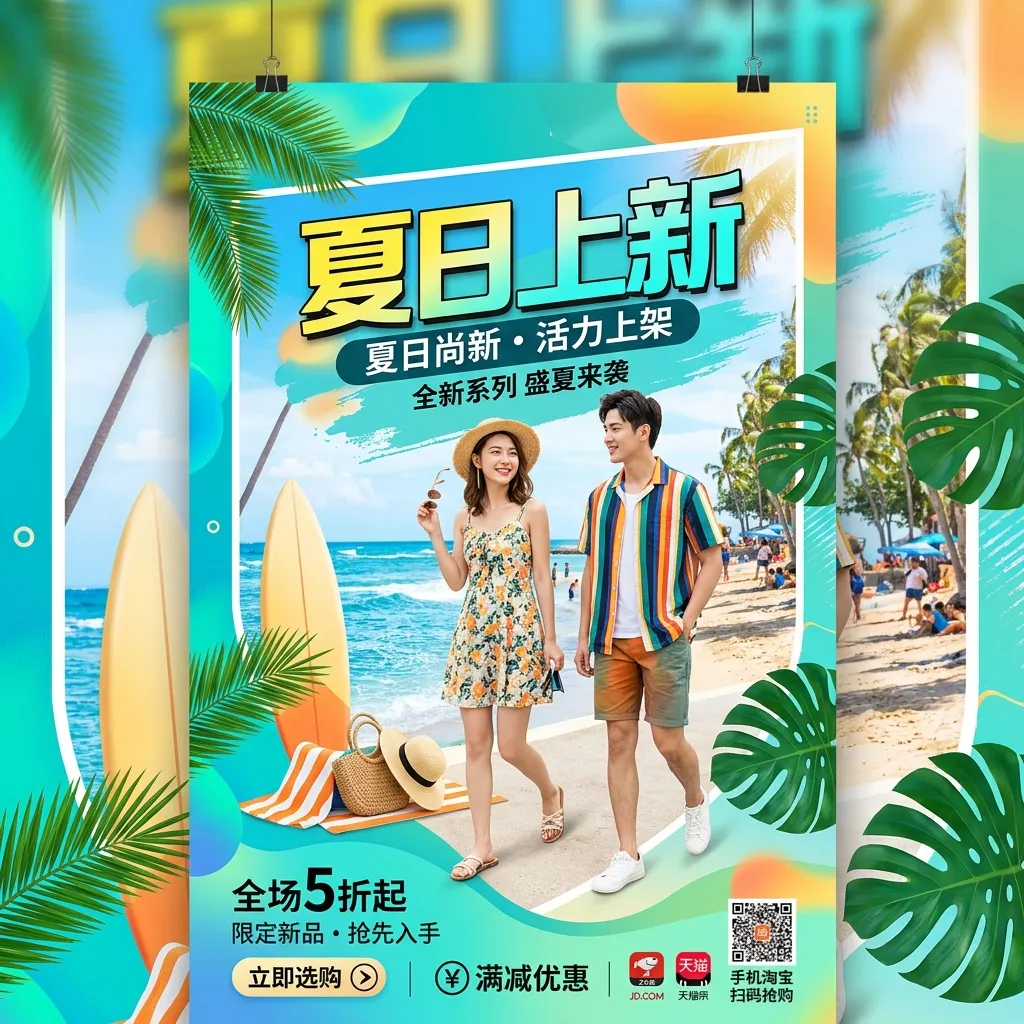
Before the main title of the event poster was modified
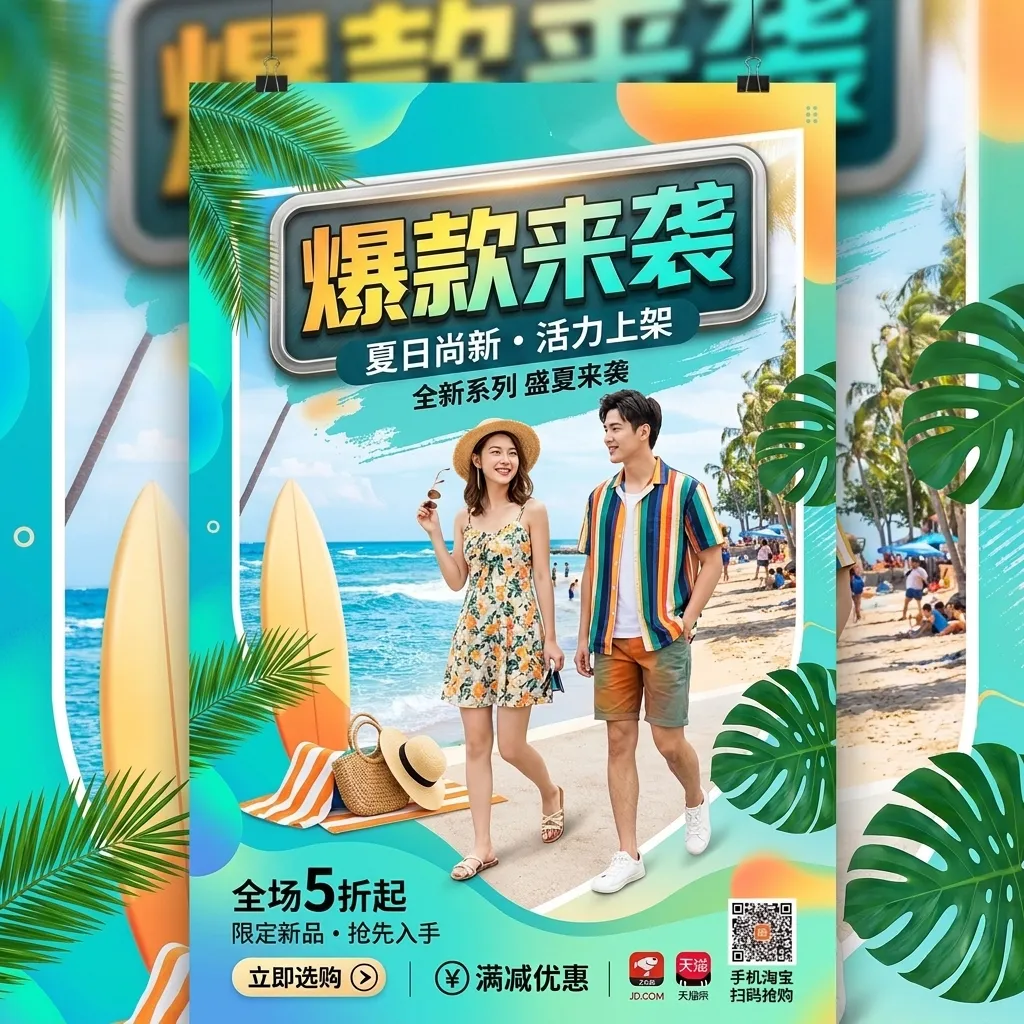
Title after modification
The effect after AI modifies the main title of the event poster

Suitable for these scenarios

Which pictures are suitable for using AI to modify text?

📣

Update poster activity copy

Replace event date, price, title or short promotional slogan, suitable for existing formats that need to continue to reuse operational materials.

🛍️

Adjust product image information

Modify the specifications, selling points or event text in the pictures of your own products, and retain the main body and visual style of the existing products.

🏪

Correct signboard and interface text

Process the text information that needs to be updated in the door sign, equipment screen and product interface, and then check the perspective and edge details.

Real effect

Before uploading the picture, first check the modification effect

AI modified picture text example: after the main title of the event poster is replaced
AI modified picture text example: Summer event poster main title before modification
Case pictures are loading...

The main title of the event poster is changed.

Keep characters, scenes and promotional formats, and replace the most eye-catching event title copy of the poster.

AI modified picture text example: Thermos cup product picture capacity parameter modified
AI modified picture text example: thermos cup product picture capacity parameter before modification
Case pictures are loading...

Product picture specification parameter modification

The main selling point and bottom specification information of the thermos cup are synchronously modified, and the main body of the product and the shooting scene remain unchanged.

AI modified picture text example: after the shop sign text is replaced
AI modified picture text example: coffee shop door sign before modification
Case pictures are loading...

Shop sign text replacement

While retaining the wooden material, street view light and door perspective, update the store name and English subtitle.

AI modified picture text example: fictional software interface discount banner text replacement
AI modified picture text example: fictional software interface discount banner before modification
Case pictures are loading...

Marketing banner discount copywriting modification

Modify the discount banner copywriting of the fictional software interface, retaining the card color matching, buttons and overall interface layout.

Operation path

Modify text on pictures in three steps

  1. Upload the picture that needs to be processed, and completely select the original text that needs to be replaced in the workbench.
  2. Each selection area is filled with new text respectively; when the content is longer, the frame is manually expanded to the right to leave space for the new text.
  3. After generation, zoom in to check the text edges, perspective and background fusion effects, and then export the picture after you are satisfied.
Open AI picture word changing tool

Tips to make the word modification effect more natural

  • When the text of the original image is clear, the background is regular, and the scope of modification is small, it is usually easier to obtain natural results.
  • When text covers faces, product edges or complex textures, it is recommended to narrow the scope of modification and process it in stages.
  • Please only upload pictures that you own, have been authorized or comply with the usage rules; tool processing does not mean obtaining the copyright of the original picture.
Browse all image processing topics

Frequently asked questions

AI modify picture text FAQ

Can AI modify the text on the picture?

Yes. After uploading the image, select the original text completely and fill in the new content; if the new text is longer, manually expand the selection box. After generation, please check the font, edge and background blending effects.

Can the modified font be completely consistent with the original image?

AI will try to be as close to the font, color, layout and perspective of the original image as possible, but special fonts, complex textures or low-definition images cannot guarantee complete consistency.

Can I modify pictures downloaded from the Internet or other people's posters?

Please only process images that you own, have been authorized or comply with the usage rules. Modifying an image does not automatically grant copyright or commercial use authorization to the original image.